
Thursday, June 7, 2007
SpaceTime 3D Browser
SpaceTime 3D is a weird little Windows-based 3D browser with a meta search engine on top. After installing the free executable, you can enter a website address and see it as a browser window placed on the sky. Click the window, and it will zoom into full view for browsing. When you enter another address, a secondary window is placed on the sky, and you can now navigate the two in 3D view (somewhat similar to what Windows Vista offers you).

Another way to use SpaceTime 3D is to run any of its different included search engines on top, from eBay products to Google web results to Google image results. Searching for “sergey brin”, for instance, will load every image result (in high quality – no thumbnail) onto a new frame in the sky, allowing you to navigate the different frames as before.
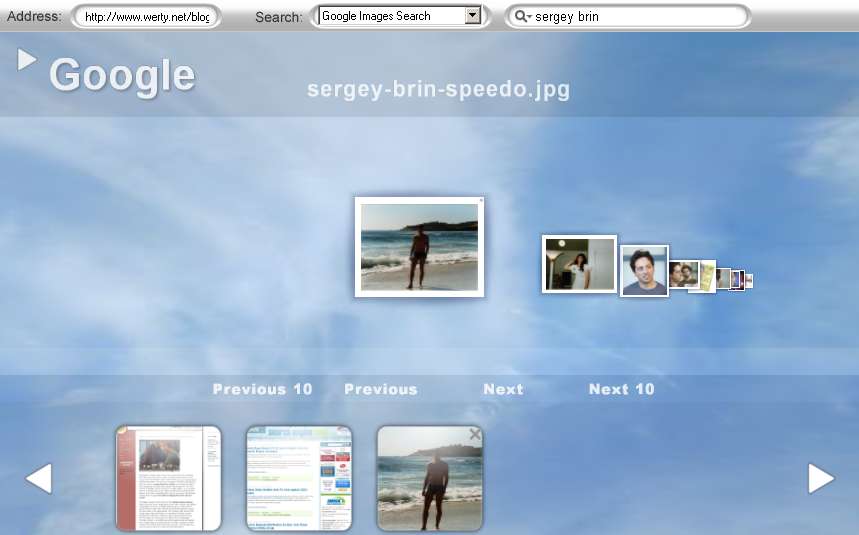
Creator Eddie Bakhash – who allegedly developed this software over the course of 8 years (hard to believe) – says, “I can’t see why anyone wouldn’t want to try SpaceTime for themselves.” But I have a reason: unfortunately, while this program looks good, it’s also incredibly memory-hungry and often very slow, with little to no added browsing value. One use I could imagine for this tool – if you have a strong machine to back-it up* – is if you want to do a presentation and you aim to show off several websites. You could then preload one page after another, and in turn have a slick 3D presentation effect. But “search at the speed of thought,” as the homepage proclaims, this isn’t.
*Minimum requirements are “512 MB of RAM, 128 MB of video RAM, and Pentium 4 2.4 GHz or AMD 2400xp+.”
[Thanks Amy G.!]
>> More posts
Advertisement
This site unofficially covers Google™ and more with some rights reserved. Join our forum!