
Friday, August 15, 2008
Google Blogger Adds Feedback Vote Buttons
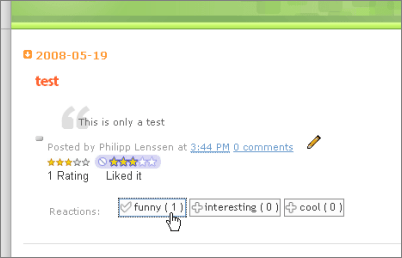
Google’s blogging service Blogger, acquired in 2003 and chronically slow with new features but lately catching up more quickly, rolled out a new feature called “reactions.” This is a quick user poll widget, available if you’re using Blogger’s experimental version, which lets you define a set of attributes like “funny”, “interesting”, “cool”, or anything else. Then, your readers can upvote each of these attributes for each of your posts using a button (without any undo functionality, apparently). Already, Google offered a star rating widget for your posts, but this is a more fine-grained way to get feedback.
To enable the reactions widget, make sure you’re using Blogger in draft mode. Then switch to the Layout settings tab for your blog and in your Blog Posts page element, click the Edit link. In the new window which opens, you’ll see the customizable reactions item.
Also, among other updates, Google changed the dashboard layout lately. If you have multiple blogs you can now click a “Hide” link for blogs you may want to access more rarely (a “Show all” link lets you view all blogs again, and allows you to toggle back the Hide settings if needed).
[Thanks Dpic!]
>> More posts
Advertisement
This site unofficially covers Google™ and more with some rights reserved. Join our forum!