
Tuesday, August 19, 2008
Google’s File-Not-Found Helper Widget
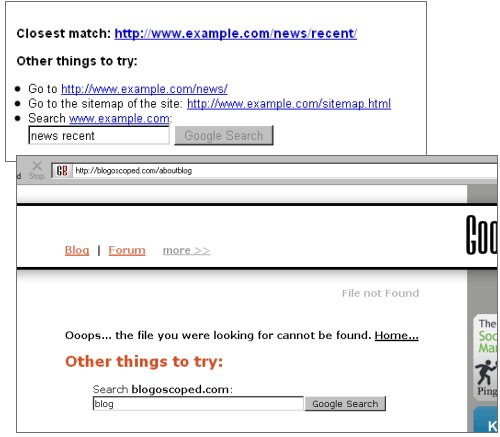
Google now offers webmasters a JavaScript-based gadget to include into their 404 (page not found) pages. Depending on where the user went and what other pages are available on the server, this widget will show suggestions of where to go, and offer a search box (sometimes with a suggested query in it as well).
To get the widget, log-in to your Google Webmaster Tools and pick Tools -> “Enhance 404 pages” from the navigation. Now copy the code snippet you’ll get into your 404 template.
In the screenshot you can see a sample by Google showing the different features, and then a live test at this blog. I’ve activated the widget here for now (I’ll probably remove it later) so you can test it by entering some non-existing URLs at blogoscoped.com. Note the widget comes with some stylesheet classes so you can change the layout.
[Via Search Engine Land. Also see Google’s help entry on the subject.]
>> More posts
Advertisement
This site unofficially covers Google™ and more with some rights reserved. Join our forum!