
Sunday, April 26, 2009
Google’s Social News Gadget
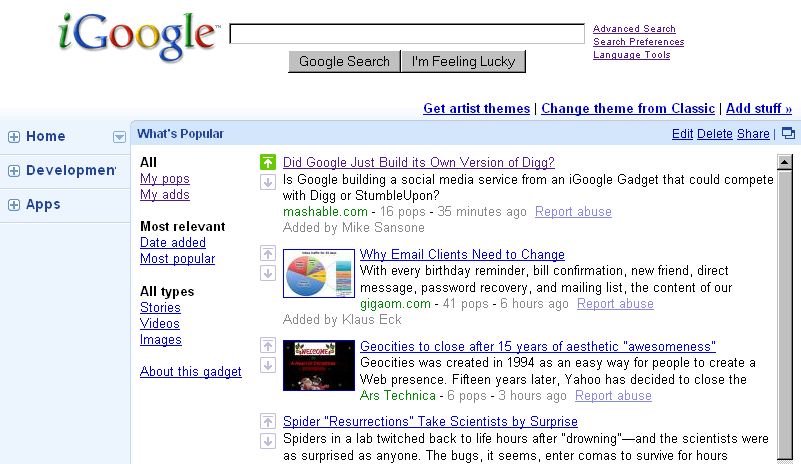
Google has an iGoogle gadget called “What’s Popular”. If you subscribe to it and expand it on your personalized Google homepage, you’ll see a social news page not unlike sites like Digg or Reddit, with up and down vote arrows. The types are split up into stories, videos and images. Google on the gadget’s about page explains that this gadget “helps you discover interesting items from all over the Internet ... What’s Popular uses algorithms to find interesting content from a combination of your submissions and trends in aggregated user activity across a variety of Google services, like YouTube and Google Reader.” (I asked Google press if they include web search history – or surfing history, via their ad network – too, and will add an update should there be an answer.)
Note usability of this gadget somewhat suffers in the expanded (canvas) view: depending on your browser size you’ll only find the add-Url box by using the outer, not inner scroll bar. When you do submit a URL, Google grabs the title and description from the target page, and you can adjust it if you want. Google’s terminology on the gadget is somewhat cryptic in places, which lowers usability, too; for instance, clicking on a tab link called “My adds” shows the message “You have not added any items to poptart yet” (I added a URL but it didn’t show up here; it did show up, but not with the title I had used, in the “My pops” tab). Otherwise, the gadget is rather straight-forward, and you may already know and understand some of the icons if you used the voting feature in Google results, before.
If you’re not a user of iGoogle, you can also bookmark the gadget’s “unofficial” stand-alone URL (there won’t be any page margin though; try the mini gadget’s URL, too).
[Via DeWitt Clinton, with hat tip to Steve Rubel.]
>> More posts
Advertisement
This site unofficially covers Google™ and more with some rights reserved. Join our forum!