
Thursday, January 4, 2007
Kidnapping Google Page Creator Images
November last year, Google added image editing to their WYSIWYG Page Creator (aka project Trogdor). The image editor allows you to resize the image, crop it, rotate it, and apply a bunch of filters, like brightness, mash-up (to overlay your image with one Google provides), color reduction, and sharpness. What's interesting is that you can kidnap the image URL, adjust its parameters, and include the resulting image on another, non-Googlepages.com place of yours. Here's an image URL sample, broken into several lines:

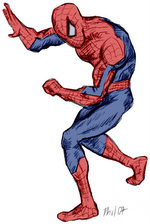
For reference, here's the original image (in smaller size):
Now let's adjust some parameters – I'm not using Google Page Creator, I'm just changing the image source (though I'll mirror the pic on this server in case Google decides to disallow hotlinking):
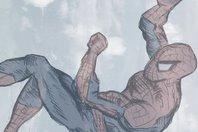
Let's break up the different parameters of the URL – the syntax is always name:value1,value2,value3,...;, with effects being part of a common group which accepts the effect name as value:
| size: 177, 265; | // size in width and height (the image scales in proportion only) |
| blend: clouds2, 54; | // mash-up with "clouds2", "sandwaves", "colorbands", "stars2" etc. in percent |
| crop: 0.1, 0.01, 0.85, 0.76; | // cropping from left/ top to right/ bottom, with floating point values from 0 - 1 |
| brt: 53; | //brightness from 0 - 150 |
| rot: 90; | // rotation in degrees, |
| effect: grayscale, 65; | // grayscale in percent |
| effect: sharpen, 4; | // sharpen in percent |
| effect: autolevels, 70 | // enhance image |
Note that if you provide invalid parameters, e.g. a brightness of 200, Google will send a file-not-found or one of several error pages (one of them reading "This is not because of anything you did; it's just a little hiccup in our system", which isn't entirely true...).
>> More posts
Advertisement
This site unofficially covers Google™ and more with some rights reserved. Join our forum!