
Wednesday, March 26, 2008
New Google Documents Menu
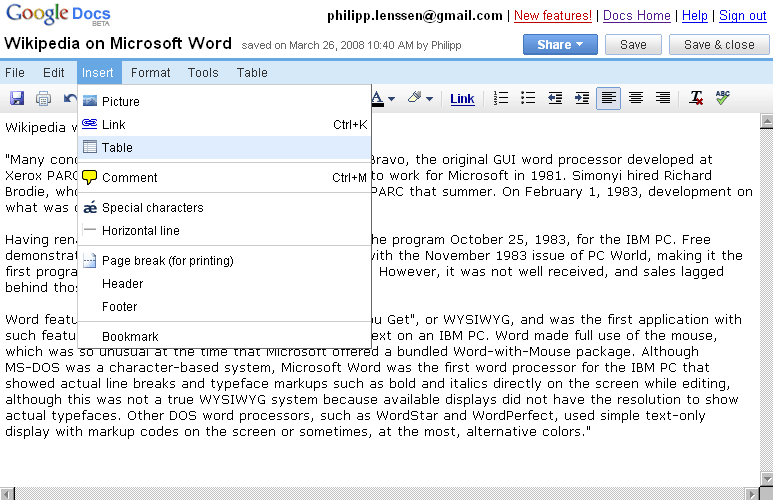
The Google Docs document editor has a new menu (see video), similar to the one spotted in a Google employee’s presentation before. Instead of the tabs, the menu is now more traditional, along the lines of what people know from their typical desktop applications from years ago. “Writely” (there still doesn’t seem to be an official name for this editor ever since it moved to Google) seems to be one of the most heavily worked on Google applicatons that does not have any advertisement stuck to it; a bit of its visual history can be seen below.
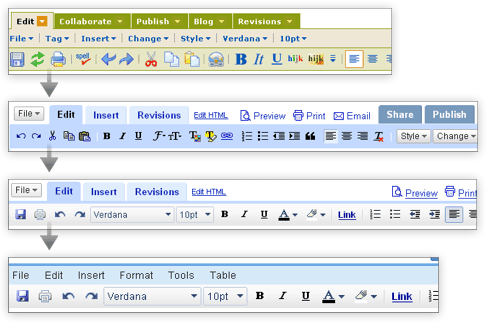
Indeed, tabs as Writely used them were a slightly wrong metaphor for the Insert functionality – as the full content below the tab did not change – albeit it made some sense for the revision history, HTML editing mode, as well as the sharing features. Sharing is now accessible by a button at the top right, whereas the revision history moved to the File menu, and the HTML editing to the Edit menu.
The menu has a bonus other than just allowing Google to keep the interface uncluttered while adding features; there’s now enough place to print the keyboard shortcuts (like Ctrl+K to insert a link) right next to the entry. On the downside, at least in Firefox the menu is overlaid by the blinking editing cursor, which looks slightly confusing. Also, the other apps of the “Google office” suite – Presentations and Spreadsheets – do not have the new-style menus yet, which adds some inconsistency.
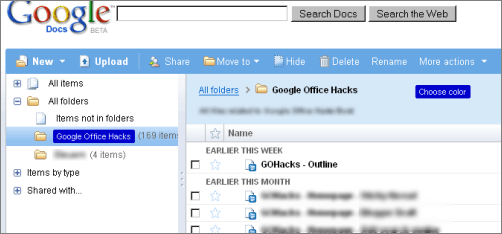
In other Google Docs news, you can now pick folder colors in the file explorer, and a new menu entry of the “More actions” button lets you directly change the document owner. Plus, there were some Google Spreadsheets changes recently, including the (apparently new) functions Sort, Filter and Unique.
[Thanks Jérôme, Keith and Tony! Writely screenshot with hat tip to Ionut.]
>> More posts
Advertisement
This site unofficially covers Google™ and more with some rights reserved. Join our forum!