
Friday, March 28, 2008
Mash YouTube Videos
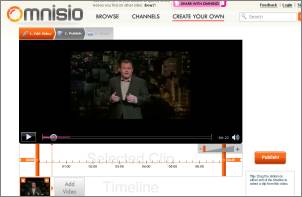
Omnisio lets you paste in the URL of a YouTube video (among other video sites) and then crop the time slider to a specific part. You can then add more videos if you want, and publish the result to show to others – without even registering at the site, a cool approach. The site is fairly straightforward to use and all in all well done, albeit the editor interface is unnecessarily confusing*, and there seems to be a bit of a lack of available effects (like fade in/ fade out, color effects, text overlays and such).
Note you need Flash 9 for this to work, and the Firefox auto-installer may cause problems. Going straight to the Flash 9 installer, shutting down Firefox and then installing it works though.
For sample purposes, I mashed these two videos into this new one. (While the first video is credited automatically on the generated page, I did not find a link to the second one.) Another video, created by the site’s co-founder Julian Frumar, shows several clips with Michael Jackson “getting progressively whiter.” As you can see, there will be user comments overlaid on top of certain parts of the video; but even when you can easily toggle this off, it’s an obtrusive feature if set to default and I imagine many would prefer this to be opt-in. (One of the anonymous comments on the Michael Jackson video, interestingly enough, reads “these comments suck ... get of the screen ... please.”)
YouTube also has an online video editor, but last time I checked it was completely broken. Also, Google Video allows you to directly link to a certain part within the video by appending e.g. #4m12s (the minutes and seconds into the video) to the video URL.
[Via Venturebeat.]
*E.g. the zoom tool is styled in a way that is closely resembles a sound level slider, and there are two different time sliders on top of each other.
>> More posts
Advertisement
This site unofficially covers Google™ and more with some rights reserved. Join our forum!