
Thursday, April 10, 2008
Tip: How to Reorder iGoogle Tabs
By Tony Ruscoe
One thing that iGoogle doesn’t currently allow you to do is move your tabs around to change the order of them. A quick Google search returns hundreds of pages where iGoogle users are asking how to do this. Until this feature is officially added, here’s how you can do it yourself...
Yesterday, Google added a feature to iGoogle which allows you to export and import your settings.
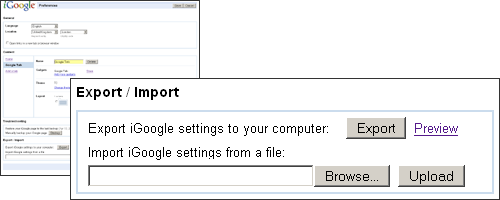
Exporting your settings to your computer downloads an XML file which contains information about all of your tabs, gadgets and theme settings. (You can see what yours looks like here.)
If you’re familiar with XML, it should be quite obvious what you need to do. If not, simply follow these steps:
- Go to your iGoogle settings page, scroll down to the Export / Import section and click the “Export” button. (You’re going to edit this downloaded XML file, so I recommend making a copy just in case things go wrong!)
- Open the XML file in a text editor, such as Notepad, and look for the sections which start with
<Tab title=. There should be a section like this for each of your iGoogle tabs. (If there are any you don’t recognize, they could be used by iGoogle for Mobile.) - Find the section which corresponds to the tab you want to move and cut everything between
<Tab title=and the next occurrence of</Tab>(including the tags themselves). Paste it either before or after the<Tab>section that you want it to appear next to. - Now go back to your iGoogle settings page, browse for the file you’ve just edited and click the “Upload” button. Do not click “Save” button!
- Once you see the “Import completed.” message below the upload field, go back to your iGoogle home page and you should see your tabs have changed order!
(If things didn’t go to plan, find the copy of your XML file and upload that, which should restore everything to the same as it was before.)
[Hat tip to Colin Colehour!]
>> More posts
Advertisement
This site unofficially covers Google™ and more with some rights reserved. Join our forum!