
Thursday, May 28, 2009
Google Apps Script: Expanding the Google Office With Your Own JavaScript
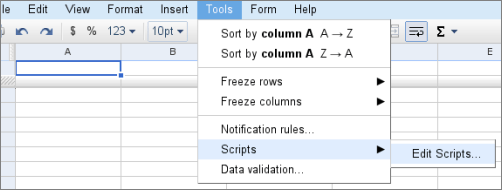
A public document footnoted with “Google Confidential” mentions Google Apps Script, a framework that looks like a kind of macro language (and more) for Google’s web office. The terms of service mentions a “Trusted Tester Agreement”, but Google did blog about this so it’s no secret; Google says “we’re inviting a limited number of Google Apps domains – about a thousand organizations – to start playing with Google Apps Script and giving us feedback so we can quickly understand which tricks would be the most beneficial to learn next.” (A preview sign-up form is provided, too.)
According to the intro page, with scripts you can:
- “Create your own custom spreadsheet functions”
- “Automate repetitive tasks (e.g. process responses to Google Docs forms)”
- “Link multiple Google products together (e.g. send emails or schedule Calendar events from a list of addresses in a Spreadsheet)”
- “Customize existing Google products (e.g. add custom buttons or menus to run your own scripts)”
To edit a script, you’ll be using JavaScript within Google’s web editor (or another desktop tool of choice). Some basic sharing is supposedly supported as well. However, the JavaScript is not executed client-side, but server-side instead. “As a result, direct operations on the client-side DOM are not supported, although some restricted functionality is provided.”
The introduction links to a documentation which mention “Google Web Scripts" for the services Google Base, Calendar, Mail and Spreadsheets. The following sample images are provided in a Google tutorial:

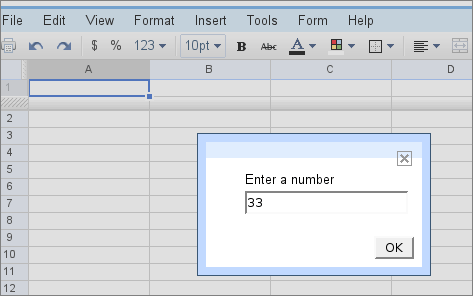
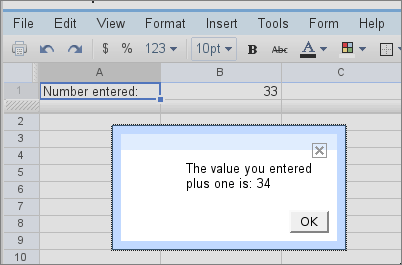
Google explains, “A dialog box should pop up in the Spreadsheet and request you to enter a number. Enter one and click ’Ok’ ... Then, the spreadsheet cells A1 and B1 are updated. Finally, a second dialog box shows the value you entered plus 1.”
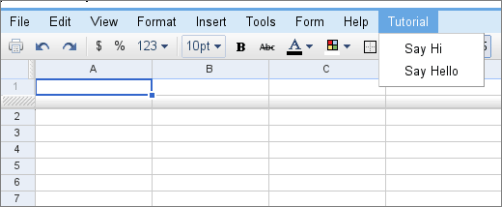
The following screenshot from a different tutorial illustrates adding your own menu entries to Spreadsheets:
Another tutorial, labeled “Advanced”, aims to show how to “collect information from different users in a Spreadsheet using Google Forms, then leverage it to generate and distribute personalized emails.”
[Thanks Jérôme!]
>> More posts
Advertisement
This site unofficially covers Google™ and more with some rights reserved. Join our forum!